







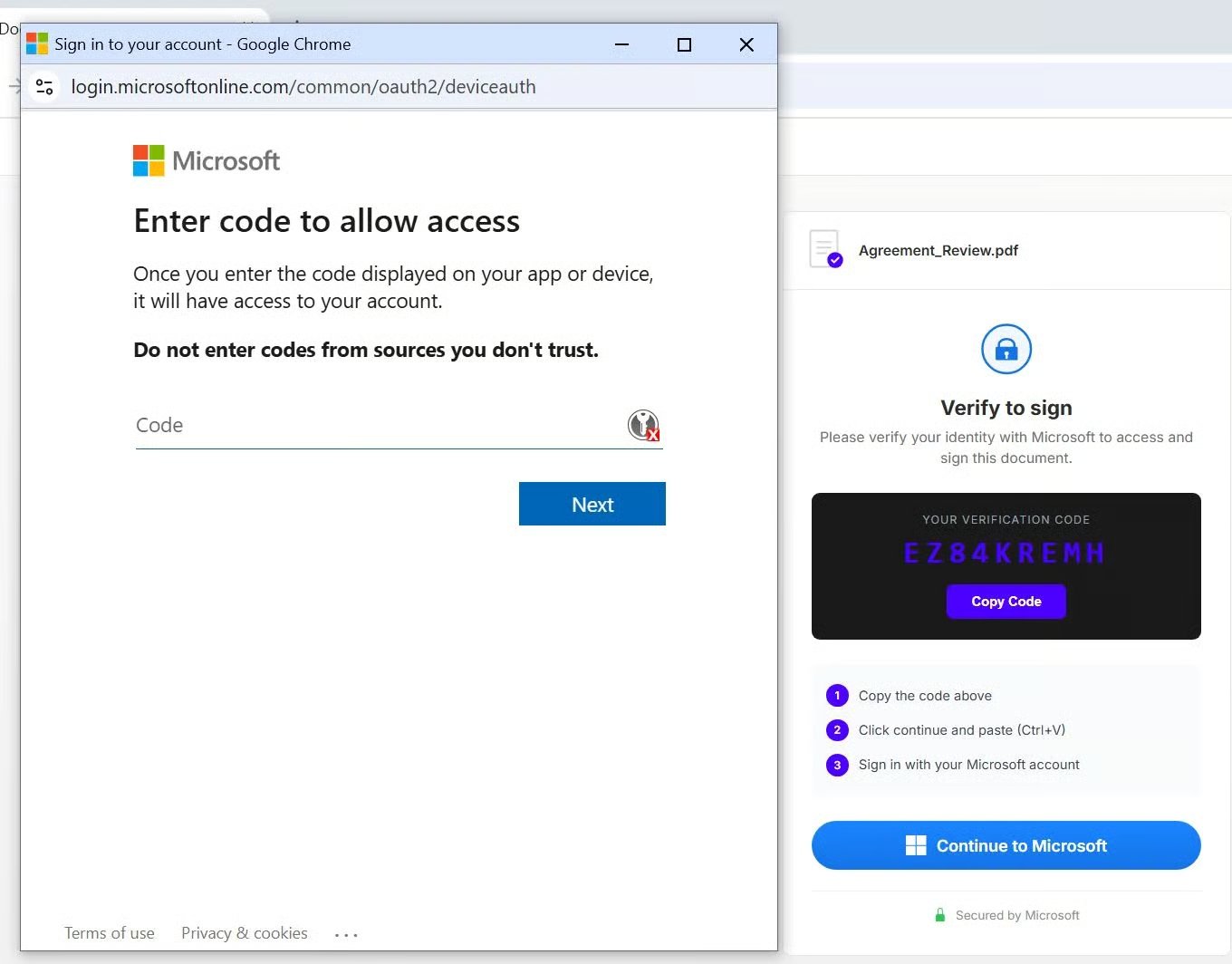
More than 340 organizations across five countries have been caught in a sophisticated phishing campaign that weaponizes a trendy cloud platform designed for non-coders.
Over the past several weeks, a phishing campaign targeting Microsoft 365 accounts has exploded across the United States, Canada, Australia, New Zealand, and Germany. Security firm Huntress first spotted suspicious activity on Feb. 19, with just a handful of cases. By March 2, the problem had turned into a full-blown crisis.
How the attack works: No password? no problem
This isn’t your average “click this link to reset your password” scam. Instead, it exploits a legitimate Microsoft feature called the OAuth device authorization flow. This was originally designed for devices that are hard to type on, like a smart TV or a printer.
The attacker generates a code and tricks a user into entering it on Microsoft’s official login page. Once the victim does this, even if they have multi-factor authentication (MFA) enabled, the attacker is granted a token that provides access to the account for up to 90 days.
According to Huntress, “Multi-factor authentication is not an effective mitigation for this attack because the victim inputs the code, then their username and password, and then MFA code if applicable. The resulting authentication generates a token that the attacker can retrieve, thus negating the protection of MFA.”
The unlikely weapon: Railway.com
What makes this campaign particularly unusual is the infrastructure behind it. All the attacks Huntress observed are coming through Railway.com, a platform-as-a-service provider that markets itself to “vibe coders” and beginners.
Railway lets anyone deploy applications with just a few clicks. Sign-up requires only an email address. The platform provides automatic security certificates, clean internet addresses, and outbound internet access. For someone looking to build a website quickly, it’s a dream come true. For someone looking to launch a phishing campaign, it’s apparently just as useful.
Huntress found that roughly 84% of the malicious authentication events came from just three Railway IP addresses:
- 162.220.234[.]41
- 162.220.234[.]66
- 162.220.232[.]57
Railway’s IP ranges, 162.220.232.0/22 and 162.220.234.0/22, are legitimate cloud provider space. Microsoft’s security systems have no reason to flag logins from these addresses as suspicious. And that’s precisely the problem.
Railway solutions engineer Angelo Saraceno told CyberScoop the company was first contacted by Huntress on March 6 regarding phishing traffic from a specific IP address. “The associated accounts were banned and the domains were blocked,” Saraceno said.
“Our heuristics are built to catch correlations: repeated credit cards, shared code sources, overlapping infrastructure. When a campaign avoids those signals, it gets further than we’d like,” he added.
Huntress noted that “Railway effectively hands adversaries a cloud-hosted token harvesting engine that is clean to Microsoft’s risk scoring.” The diversity of the lures is also unprecedented. Hackers aren’t just sending one type of fake email; they are impersonating:
- Construction bid proposals
- DocuSign and secure documents
- Missing voicemails
- Employee benefit updates
This variety makes it hard to pin down. Huntress admitted that “The diversity of techniques and lure types raises a question that doesn’t have a clean answer: is this one threat actor with an unusually broad toolset, or multiple actors sharing the same backend?”
Meet EvilTokens: The phishing-as-a-service shop
Huntress traced the Railway attacks to a new phishing-as-a-service platform called EvilTokens. The service was first advertised on the NOIRLEGACY GROUP Telegram channel, with its first public post on Feb. 16, just days before the campaign began.
According to Huntress, EvilTokens offers three products to customers: a “B2B Sender,” an “Office 365 Capture Link,” and an “SMTP Sender.” Both the B2B Sender and Capture Link boast “AI workflows that help in bypassing email filtering, tailoring phishing lures, and finding sensitive emails for wire fraud or data exfiltration activities.”
The platform also provides customers with open redirect links to vulnerable domains, helping them hide their true destinations.
But perhaps most troubling is the level of professionalism. Huntress noted that “the EvilTokens team has spun up a full 24/7 support team and a support feedback channel. They also have customer feedback.”
When Huntress realized the scale of the threat, the company took action. On Wednesday, March 19, it pushed a conditional access policy update to roughly 60,000 Microsoft cloud tenants. The policy blocks logins from all Railway-owned IP addresses.
Mozeleski described the move to CyberScoop as “not anything we’ve ever done before.”
The decision wasn’t made lightly. Huntress validated that no legitimate activity had been seen from Railway’s IP ranges across its customer base in the prior 14 days. The company went through an internal review across its SOC, product, leadership, and customer-facing teams before pulling the trigger.
“When customer environments are at risk, we will continue to take the necessary action to stop active threats,” Huntress stated.
How to protect your organization
Security experts recommend several immediate actions for Microsoft 365 administrators:
- Check your logs: Run searches for sign-ins from Railway’s IP ranges. Any successful authentication is a confirmed compromise.
- Revoke tokens: For any affected users, revoke all refresh tokens immediately. This doesn’t stop in-flight access tokens, but it prevents continued access.
- Block Railway IPs: Use conditional access named locations to block the Railway CIDR blocks: 162.220.232.0/22 and 162.220.234.0/22.
For medium-term protection, experts recommend:
- Block device code authentication entirely if your organization doesn’t need it. Microsoft added an Authentication Flows condition to conditional access policies specifically to address this threat.
- Enable Continuous Access Evaluation to reduce token revocation latency from about an hour to minutes.
- Require compliant devices for Exchange Online and SharePoint. Device code authentication cannot proceed if the device isn’t compliant.
- Train users on device code lures specifically. Even though the Microsoft login page is legitimate, entering a code from an unsolicited email is dangerous.
Related reading: For another urgent security alert, check out how a critical TP-Link router flaw could leave your network exposed — and why you should update now.


