










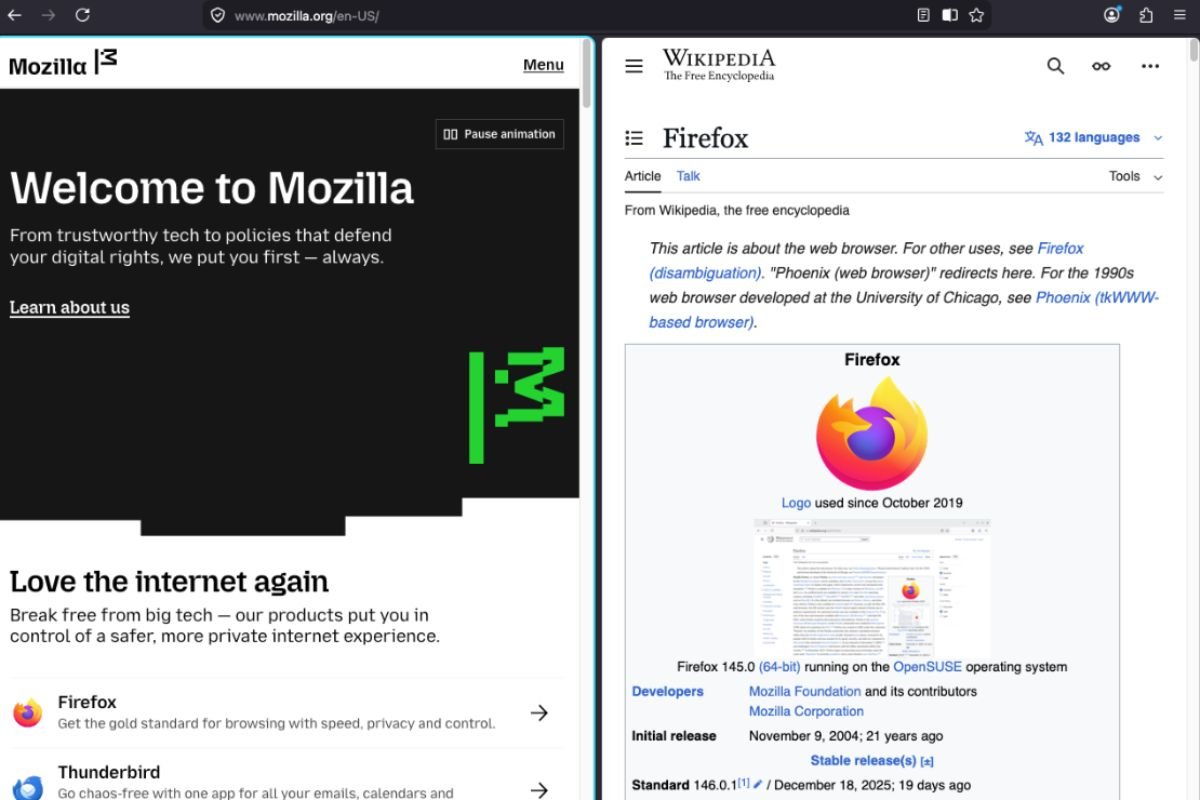
Firefox is finally inviting users to see double in a good way.
Mozilla has officially introduced a new Split View feature, now enabled by default in its experimental “Nightly” builds. The move signals a major push toward better multitasking, allowing users to seamlessly combine two different websites within a single browser window without the clunky dance of resizing separate windows.
The implementation is straightforward for those running the latest Nightly version. Users can jump into the action by right-clicking an active tab or selecting two tabs at once.
According to the official Firefox Nightly News report: “You can right click on a tab to add it to a split view, and from there select the other tab you’d like to view in the split. Or, multi-select 2 tabs with Ctrl/Cmd, and choose ‘Open in Split View’ from the tab context menu.”
Once active, the window divides into two halves, each with its own scrollbar, while sharing the main toolbar and address bar. A draggable divider also allows users to prioritize one side of the screen over the other.
Tab notes also join the test
Alongside Split View, Mozilla has also enabled Tab Notes in Firefox Nightly. This feature lets users attach short notes to individual tabs, which can be viewed by hovering over them. The idea is to help users remember why a tab is open, especially for those who keep many tabs running for long periods.
Mozilla says Tab Notes are still a work in progress, and more improvements are expected before the feature moves beyond testing.
Early AI features appear in the background
Mozilla is also laying the groundwork for future AI tools inside Firefox. According to the Nightly update, the browser now includes a new configuration option called browser.aiwindow.enabled, which allows testers to open a separate AI Window.
Mozilla cautioned that the feature is still in early development. The company noted that AI chat tools currently require users to sign in with a Mozilla account, and new settings are being developed to give users more control over which AI features they want enabled.
Meanwhile, the independent search bar in Nightly has been updated to use the same tech that powers the “AwesomeBar” (the main address bar).
Playing catch-up
While the feature is a breath of fresh air for Firefox loyalists, it places the browser in direct competition with rivals like Microsoft Edge and Vivaldi, who have offered similar productivity tools for years.
Some early testers have noted that while the feature is functional, it still has room to grow. As reported by Linux Addicts, the current version is a solid start but lacks some of the deep customization found elsewhere: “It’s almost as good as the one we found in Brave, but it’s far from Vivaldi’s.”
When will it reach regular Firefox?
If you aren’t a fan of using experimental software, you’ll have to wait a bit longer.
The Split View and Tab Notes features are currently exclusive to the Firefox Nightly channel. Following typical development cycles, these features will eventually migrate to the Beta channel for further polishing before being released to the stable version used by the general public, potentially as early as March.
For more on Mozilla’s latest updates, check out how the company recently patched 26 security flaws in Firefox.


